

You are currently on the Canada site.
Select a location to view location-specific content and shop online.
Unlock free shipping when you purchase 2 Razer Reclusa X Mini 65% keyboards.
Razer Reclusa X Mini 65%
HOT-SWAPPABLE DESIGN
Compatible with 3 or 5-pin Switches

RAZER™ ORANGE TACTILE MECHANICAL SWITCHES GEN-3
Satisfying Tactile Bump with Every Keystroke

BESPOKE KEYSTROKE FEEL AND ACOUSTICS
Tuned with Silicone Dampeners for a Clean, Clacky Profile

-
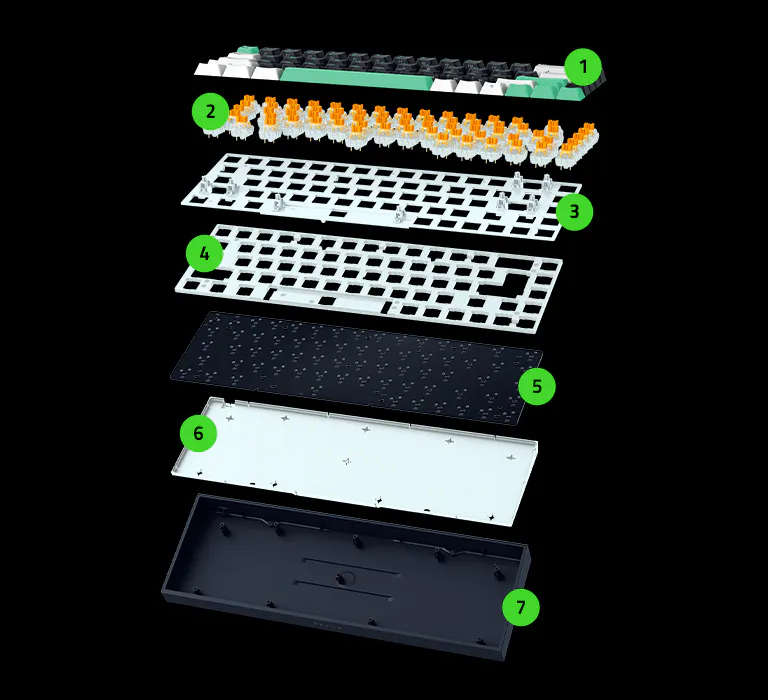 1Doubleshot ABS Keycaps
 -
2Razer™ Orange Mechanical Switches Gen-3
-
3PPS Plate
-
4
Silicone Plate Dampener -
5
PCB -
6
Silicone Case Dampener -
7
Bottom Case
DOUBLESHOT ABS SOLID KEYCAPS
Featuring a 3-Tone Color Mix

PER-KEY LIGHTING WITH SOUTH-FACING LEDS
Powered by Razer Chroma™ RGB

Description not needed: The visuals in this video animation only support what is spoken; the visuals do not provide additional information.
-
/TN0018-razer-snap-tap.svg)
RAZER™ SNAP TAP Prioritize the latest input between two selected keys without having to release the previous one. Enjoy more responsive inputs for near-instant directional changes during fast-paced games. -
/TN0019-razer-snap-flex.svg)
RAZER™ SNAP FLEX Trigger precise actions at key-release for tighter control and faster response. Snap Flex is OFF by default and can be toggled ON/OFF via Razer Synapse. -
/KB0085-dual-keypress-priority.svg)
DUAL-KEYPRESS PRIORITY Dual-Keypress Priority enhances WASD handling by allowing instant inputs from simultaneous keypresses upon release of other keys, delivering precise control during competitive play.
We’ve Got You Covered
Get up to 2 years of warranty and access reliable tech support. Purchase directly from RazerStore and get 14 days risk‑free returns.
Razer Reclusa X Mini 65% - Frequently Asked Questions
-
What is a hot-swappable keyboard? A hot-swappable keyboard allows users to personalize their keyboard by changing the switches without having to disassemble the keyboard or perform any de-soldering. For the Razer Reclusa X Mini 65%, the switches are removable. -
What switches are compatible with the Razer Reclusa X Mini 65%? Most standard 3-pin or 5-pin mechanical switches are compatible with the Razer Reclusa X Mini 65%. For a different switch feel, we recommend the Razer Mechanical Switches in Green Clicky or Yellow Linear that are sold separately. -
What is a 65% keyboard form factor? The 65% keyboard form factor is more compact than a tenkeyless keyboard. It retains commonly used keys such as the arrow keys and navigation keys, while removing the function row and numpad to save desk space. -
Does the Razer Reclusa X Mini 65% come with a keyboard wrist rest? No, the Razer Reclusa X Mini 65% does not come with a keyboard wrist rest. -
Can I disassemble the Razer Reclusa X Mini 65% to make further modifications? The Razer Reclusa X Mini 65% can be disassembled through screws located at the top of the keyboard plate. Do note that Razer’s warranty does not cover any internal damage caused by internal modifications to the keyboard. -
How do I toggle Razer Snap Tap? Hit FN + Left Shift to immediately toggle Razer Snap Tap. The A and D keys are paired to this mode by default. Paired keys will light up white when Snap Tap is on and light up red when Snap Tap is off. Snap Tap can also be enabled through Razer Synapse, where you can customize it with your preferred key assignments. -
What advantages does Razer Snap Flex provide? Razer Snap Flex lets you assign two actions to a single key - one on press and another on release. This reduces the need to reach for multiple keys, making complex actions easier to perform and helping you react faster in-game. For FPS and MMO games, it can simplify advanced techniques, improve consistency, and reduce timing errors during critical moments. -
What makes Dual-Keypress Priority worth using? Dual-Keypress Priority helps keep your movement smooth and consistent when multiple keys are pressed at the same time. Instead of inputs conflicting with each other, your keyboard prioritizes the correct movement, giving you more precise control and reducing accidental input changes. For games like Counter-Strike 2 and Valorant, this can make movement feel more reliable during fast-paced situations. -
How do I ensure I am getting the best experience out of my keyboard? To achieve the best experience with the Razer Reclusa X Mini 65%, ensure the firmware and Razer Synapse have been updated to the latest versions. -
Where can I buy the Razer Reclusa X Mini 65% mechanical gaming keyboard? The Razer Reclusa X Mini 65% is available from raizer.live and RazerStore, as well as selected retailers.